|
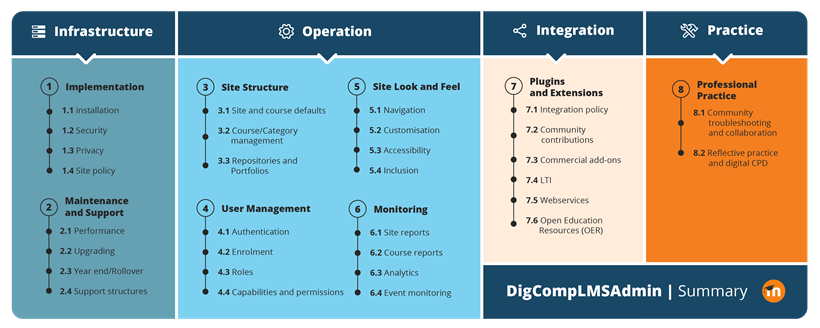
Module and Competence
|
Duration
|
-
Professional practice
Experience is shared with appropriate personal, institutional and community connections
-
- Community troubleshooting and collaboration - Report bugs and raise queries in the Moodle community via the Tracker and Moodle.org and contribute to the Moodle docs. Contribute within the organisation's local or regional communities.
-
Reflective practice - Engage in post-upgrade reviews, discussions with other admins, personal journals / blogging.
|
10 hrs
|
-
Implementation
An appropriate LMS is installed on an agreed OS with appropriate institutional safeguards in place.
-
-
Installation - Set up an LMS on a suitable hosting environment.
-
Security - Incorporate good practice in embedding security in the LMS.
-
Privacy - Enable agreed privacy procedures appropriate to the institution and location.
-
Site policy - Enable agreed site policies appropriate to the institution and location.
|
10 hrs
|
-
Maintenance and support
The LMS is regularly maintained and upgraded according to agreed deadlines.
-
-
Performance - Use recommended performance measures for optimisation and scalability.
-
Upgrading - Implement an agreed policy of regular upgrades.
-
Year end / Rollover - Incorporate regular backups and resets in line with institutional requirements.
-
Support structures - Support learners and staff to use the LMS.
|
10 hrs
|
-
Site structure
The LMS is organised in line with institutional requirements.
-
-
Site / course defaults - Enable and record the most suitable site settings for the institution. Consider the use of course templates and site admin presets.
-
Course / Category management - Organise the LMS learning pathways in line with the needs of the institution.
-
Repositories / portfolios - Select the appropriate standard repositories and portfolios for learning and teaching.
|
10 hrs
|
-
User management
Access to the LMS meets requirements and can adapt to changing needs
-
-
Authentication - Identify, enable and monitor authentication methods relevant to the institution.
-
Enrolment - Identify, enable and monitor enrolment methods relevant to the institution.
-
Roles - Assign, adapt and create roles appropriately.
-
Capabilities and Permissions - Make thoughtful use of permissions to extend or restrict capabilities.
|
10 hrs
|
-
Site appearance and functionality (UX)
The LMS is appropriately branded and offers an accessible, inclusive user experience.
-
-
Navigation - Use appropriate settings and features to ensure users can easily locate everything in the LMS
-
Customisation - Brand or personalise the LMS with standard or contributed options
-
Accessibility - Ensure the LMS meets official accessibility standards.
-
Inclusion - Ensure access on mobile devices, via mobile browsers and the mobile app, and mobile-friendly courses.
|
10 hrs
|
|
7. Monitoring
Relevant reporting and analytics processes optimise the LMS for learning.
-
-
-
Site reports - Run, create and, where appropriate share, relevant site reports with appropriate stakeholders.
-
Course reports - Understand and promote the use of course reports.
-
Analytics - Critically evaluate and implement, where appropriate, learning analytics.
-
Event monitoring - Critically evaluate and implement where appropriate event monitoring.
|
10 hrs |
|
8. Plugins and Extensions
Plugins and external services extend the LMS.
-
-
-
Integration policy - Implement and update plugins and other integrations in line with an institutional policy.
-
Community contributions - Install agreed useful plugins from the Moodle Plugin directory.
-
Commercial add-ons - Connect to agreed purchased integrations such as Student Management systems or LMS integrations.
-
LTI - Evaluate and implement requested External tools, mindful of appropriate security and privacy settings
-
Web services - Understand and, where appropriate, enable and use relevant web services.
-
Open Educational Resources (OER)- Enable and promote the sharing of open content via Moodle.Net.
|
5 hrs |
|
Total hours:
|
75 hrs
|